The CPT Macros functionality allows billers to add a set of frequently used CPT codes with a single click when creating a charge from the New Charge screen. To utilize CPT Macros functionality you must configure CPT macros accordingly.
Key Points to Know when Configuring CPT Macros
| • | You can add maximum 50 CPT codes within single CPT macro. |
| • | When adding CPT codes to any macro, system allows setting modifiers and units for quick operation. |
| • | You can add single CPT code multiple times using different modifiers. |
To configure CPT macros:
| 1. | From the left menu items, select Administration > Setup > CPT/Revenue. |
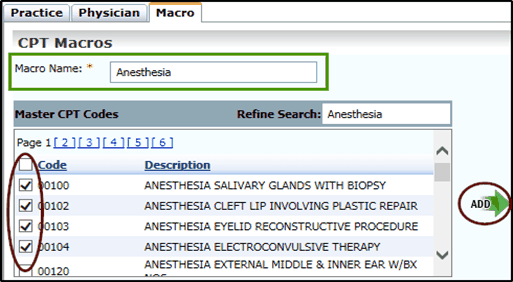
| 3. | On the CPT Macros screen; |
| • | In the Macro Name field, enter the name of the CPT macro to be configured. |
| • | From the Master CPT Codes section, select the CPT codes to be added in Macro. You can also use the Refine Search option to search desired CPT codes. |
| • | Click Add. A list of CPT codes is then displayed next to the Add button. |
| 4. | Select one or more modifiers for each CPT code, if required. |
| 5. | Change units, if required. |
